
Remote Rodent Monitoring for Commercial Accounts
Remote monitoring puts a sensor on the traps and stations your program already runs. Interactions are counted and time-stamped, trend logs go into your service reports, and a trap that fires notifies us, so a technician is dispatched to service it rather than the device waiting for the next scheduled visit.
Call 360-410-2199 Request a free inspection
Remote monitoring: the job at a glance
| What it covers | Sensors on the rodent traps and bait stations in an existing commercial program |
|---|---|
| Included | Interaction counts and times per device, trend logs in your service reports, and a technician sent when a trap fires |
| Not included | Residential accounts, and naming the species or finding the entry point, which the service visits still do |
| What your site needs | No Wi-Fi, power or IT work; the hub reports over cellular and the sensors run on batteries |
| What it costs | Quoted per site as an add-on, by how many devices you run and how they are placed |
What it is
Remote monitoring is a sensor fitted to the rodent devices in a commercial program. The stations and traps stay exactly where a technician decided they should go; the sensor is what changes, and what it changes is how quickly anyone finds out that a device did something.
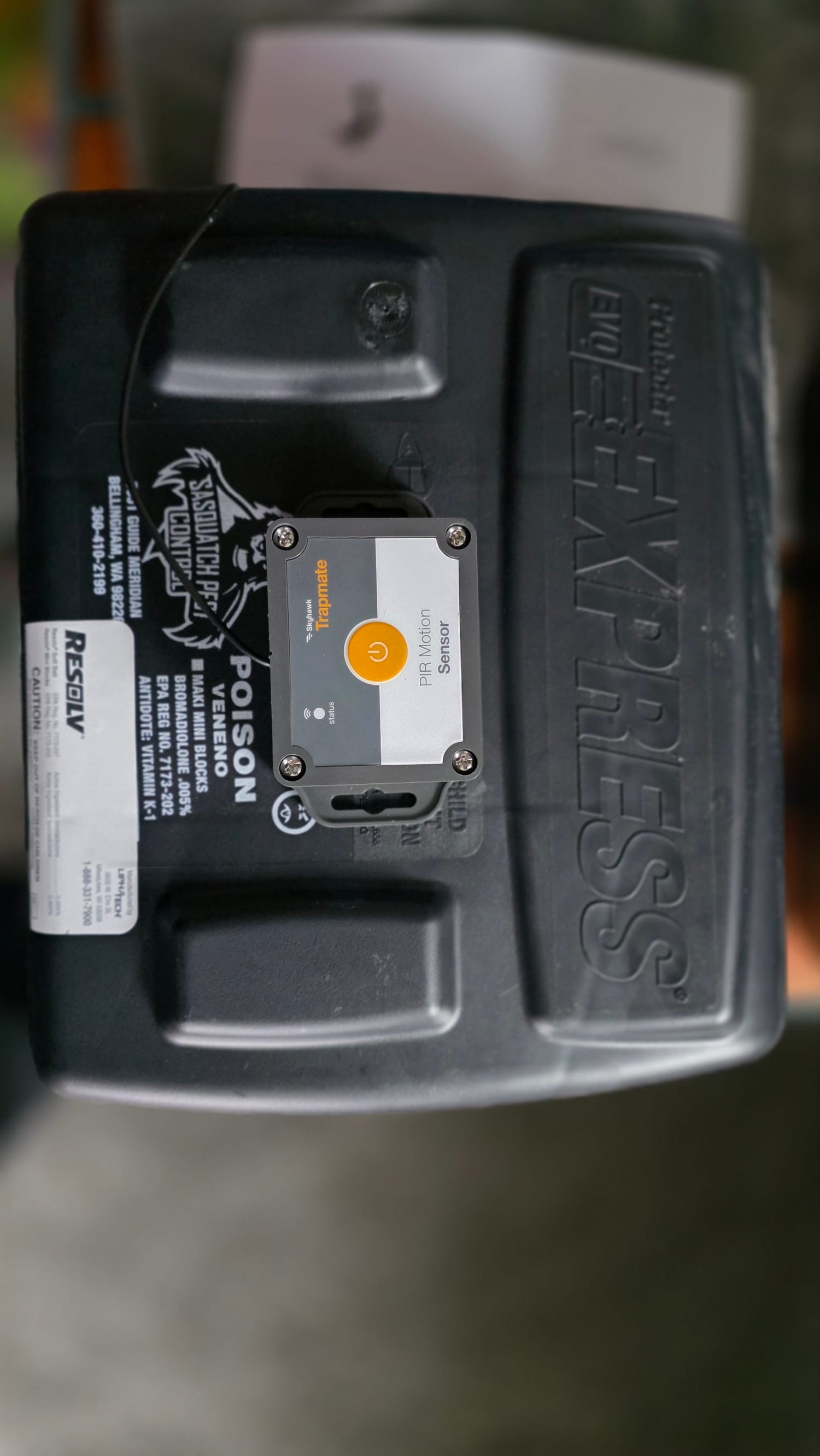
The equipment is Skyhawk Trapmate. A small unit clips to a snap trap or to the lid of a tamper-resistant bait station and reports activity at that device. On a site running dozens of devices across a building and its yard, that turns a monthly walk into a running record. The tamper-resistant station is not a house preference, incidentally: the EPA’s restrictions on rodenticide products are the reason bait sits inside a protected, secured block rather than loose, and a sensor on the lid leaves that arrangement exactly as it was.
It goes on the devices you already have. That is the part worth knowing before anyone quotes you: Skyhawk’s sensors mount to existing traps and stations rather than requiring proprietary ones, so adopting monitoring does not mean replacing the equipment on your site.
Three ways of sensing, for three kinds of device. Skyhawk publishes a vibration sensor that reads the movement of a trap firing, a magnetic reed switch that reads a trap arm or a door moving, and a passive infrared sensor that reads the body heat of an animal inside a multi-catch trap. Which one goes on a device depends on the device — a snap trap, a station and a multi-catch box each report differently.
The hub talks over cellular. The sensors report to a hub, and the hub reports out over the cellular network rather than over your Wi-Fi, so it does not need a password, a port, or a conversation with your IT department. Skyhawk states a range of more than 500 feet between hub and sensors, and battery life of five years or more on a set of two AA cells in the infrared sensor. Batteries are replaceable; nothing is hard-wired.
What you get out of it
Interaction counts. How many times each device recorded activity, by device, rather than an impression of how the site is doing.
Times of the interactions. When they happened. A dock station that reports at three in the morning and a break-room trap that reports mid-shift are two different problems with two different fixes, and the clock is what separates them.
Trend logs in your service reports. The count from one visit is a measurement; the same count across eight weeks is information. Trend data is what shows a program working, and it is what shows a new pressure arriving before anyone sees an animal.
A notification when a trap deploys — to us. That is the part that changes the response. When a device fires, we are told, and a technician is scheduled to go and service it rather than the trap sitting until the next routine visit. On an account where a sprung trap left in place is a finding in its own right, that gap is what the sensor closes.
Why the alert comes to us and not to you
This is a deliberate choice and it is worth explaining, because most of the industry sells it the other way.
An alert is only useful to somebody who can act on it. A notification at 2 a.m. that station 14 has recorded activity does nothing for a facilities manager who cannot get into the building and would not service the device if they could. The same notification routed to us produces a technician.
If your operation wants the raw feed as well — some quality managers do, particularly where the pest file is part of an audit — say so and we will set that up. The default is the one that ends with the device actually serviced.
Where it earns its money
Remote monitoring is worth most where a device being left unattended is expensive or where the site is too large to read by walking it:
Food processing and cold storage. Long runs of exterior stations, interior devices in areas with restricted access, and an audit that asks what happened at each one.
Restaurants and food service. Small device counts, but a sprung trap behind a line during service is not something anyone is going to notice until the next visit.
Warehouses and distribution. Dock doors open all day, a perimeter longer than the building, and enough devices that ranking them by activity is the only way to prioritize.
Multifamily and property management. Shared structures where the question is always which unit or which run the population is actually using.
Any account with a documented program. If your pest file is read by an inspector, a landlord, or a customer’s auditor, device-level history answers questions that a signature on a service ticket does not.
What a sensor does not do
This matters more than the feature list, and we would rather say it here than have you find out later.
A sensor reports that something happened at a device. It does not identify what tripped it. It does not know whether you have Norway rats moving in from a greenbelt or house mice breeding in a wall void, and those are opposite jobs. It does not find the gap under the dock leveler that let them in, and sealing that gap is still the work that ends the problem rather than managing it.
It also does not fix a program that is wrong. Devices in the wrong places report from the wrong places, faster. The value of the data is downstream of the walkthrough that decided where the devices went, which is why this is an add-on to a program rather than a product sold on its own.
How it goes on an account
At the walkthrough. We look at what you run now, where the devices are, and where a hub can sit so the far end of the site still reaches it. Skyhawk puts the hub-to-sensor range past 500 feet, which is generous and is still a number a long building, a yard fence line or a concrete basement can eat, so it is better answered by walking it than by assuming it.
On the scope. Which devices get sensors and what the monitoring adds to the program is written into the same scope as the rest of the work, with the count on it.
In service. The devices keep being serviced on the schedule. The notifications decide which ones we visit between scheduled days, and the reporting is folded into the record your file already keeps.
At review. The trend log is the part worth reading together. Two or three services in, it usually starts saying something about the building that nobody had noticed.
Around the county
Most of this work is in the commercial corridors — Bellingham’s industrial areas and waterfront, the Guide Meridian, the Burlington and Mount Vernon retail and distribution corridor, and the agricultural accounts in the Lynden and Everson area, where the yard is the problem and the building is downstream of it. For the dairy and berry operations in particular, device-level history is what turns “we have rodents” into a map of where they are working.
Getting it on your program
If you are already a commercial account, it is a conversation and a quote. If you are not, the monitoring is not where to start: the program comes first, because sensors on badly placed devices produce fast, precise, useless information. We would rather walk the site, get the devices right, and add the monitoring to something that already works.
Call or text 360-410-2199 and ask for a commercial walkthrough. See commercial pest control for how the programs are built and documented, and rodent control for the exclusion work that ends a rodent problem rather than measuring it.
Frequently asked questions
Is this available on a residential account?
No. It is an add-on to a commercial program, because what it produces — interaction counts, times, trend logs across many devices — is what an audited or inspected business needs and what a house does not.
Do I get alerts on my phone?
The notification goes to us, not to you. When a device reports, we see it and schedule a technician to go and service it. What you get is the response and the record, rather than a phone that buzzes at two in the morning about a trap in a warehouse you cannot reach.
What is actually in the reporting?
How many interactions each device recorded, when they happened, and how that pattern moves over time. That last part is the useful one: a device going from two interactions a week to nine says something a single visit cannot.
Does this replace the service visits?
No, and anyone selling it that way is overselling it. A sensor reports that something happened at a device. It does not identify the species, find the entry point, or tell you why the population is there. The visits still happen; the sensors decide where they go first and when an extra one is needed.
What does it cost?
It is quoted per site as an add-on, because it depends on how many devices you run and how they are placed. It goes on the same written scope as the rest of the program, and no device is added to your count without it being on that scope.
Do the sensors need anything from us — Wi-Fi, power, an IT conversation?
None of the three. The hub reports over the cellular network rather than your Wi-Fi, everything is battery-powered with replaceable cells rather than hard-wired, and the sensors mount to the traps and stations you already run. What we do need is somewhere the hub can sit within range of the far devices, which is what the walkthrough settles.
Guides
Remote Rodent Monitoring in Whatcom County?
Family-owned, no long-term contracts, and every treatment is backed by our 100% Service Guarantee.
Most calls in Whatcom County are out within 1–2 days, about 3 during the late-summer peak.
Last updated